The Whirlwind That Is October – Part 3

October has been such a whirlwind of PASS activity for me. Two SQL Saturdays and the PASS Summit. This post is about the PASS Summit in Seattle, October 27 through 30. You can read about my SQL Saturdays here and here. Settle in, get a cup of <insert caffeinated beverage of choice>, this is going to be a long one.

I arrived in Seattle on Saturday, October 24th. Since I spent a lot of my formative years in the Pacific Northwest, I usually go early and have family and/or friends meet up with me for the weekend, but this year life just got in the way so I spent Saturday afternoon and Sunday wandering around Seattle alone doing touristy things and stocking up on souvenirs for those left at home.

Monday morning came bright and early and I headed over to RedGate‘s SQL in the City event. This is the fourth year that I’ve attended this event. It mostly showcases how to use RedGate products, but there are some other useful sessions as well. One that I particularly liked was the workshop that called on SSDT users. They broke us up into two groups and had a RedGater leading the conversation. I got to meet some new folks like Phil Helmer (B | T) and know that I wasn’t alone with some of my frustrations when using TFS in SSDT. Of course Bill Fellows (B | T) was there providing valuable insight as well. And yes Bill, I will blog about my build and deploy process sometime in the near future. I also got to meet Andrea Allred (B | T) in person. We had connected over Twitter via our musical interests and really hit it off in person. Andrea I can’t thank you enough for encouraging us to drive 4 hours to see The Struts (B | T), it truly was an experience I will never forget. I also got to officially meet Sheila Acker (T). She has been a familiar face for the last five years, but we officially met this year. So nice to finally meet you Sheila.

I ended my Monday by catching up with my dear South African friend Martin Phelps (B | T) at Rock Bottom Brewery. He has a lot of work ahead of him, he and his teammates are trying to make it to the World Championships of sky diving in April 2016. Good luck Martin!

I got to sleep in a bit on Tuesday before I hit my favorite hole in the wall eatery, Blue Water Taco Grill (BWTG). Let me just say that I LOVE BWTG. I live in High Point, NC, where they think that a good breakfast burrito is what you get at Chik-Fil-A during their breakfast hours – NOT! I miss my breakfast burritos from Pete’s Kitchen in Denver and while the one that I get at BWTG is not smothered in green chile, it does have chorizo in it – food fit for a king (or queen as it were). But I digress, on with the adventures of Tuesday.

Tuesday was a day for meetings, the SQL Saturday Organizer and Chapter Leader meetings. These were fabulous, got some great ideas for ways to advertise SQL Saturday and my local chapter. After my meetings I hung out with Andrea and her husband Ryan Allred (T) for a while talking music. We exchanged some of our favorite band names, which I am still going through. Then it was off to be a PASS Ambassador for the Welcome Reception. For those that don’t know me, this is my “Most favorite-est” (as my youngest niece would say) thing to do at Summit. I can’t stand up in front of a room of thirty people and present a session without almost hyperventilating, but I have absolutely no problem standing in a crowd of people and greeting them with smiles and assistance when needed.

If you couldn’t tell, I am a big music fan, so it was no contest when I found out that Florence + the Machine (B | T) was playing in Seattle on Tuesday night. After my PASS Ambassadorship ended, I skipped the volunteer party and headed straight to Key Arena. Florence did not disappoint, she performed barefoot (as usual) and was very “twirly”. After a very long day of nonstop action, I headed back to the hotel to get some much needed sleep.

Wednesday started off very early with being a PASS Ambassador once again. Did I mention that this is my favorite volunteer job at Summit? I was at the top of the escalators at 6:45 a.m. greeting attendees, speakers and sponsors. One thing that was new this year was the Ask Me! hand sign. I still haven’t found out whose brain child that was, but when I do, look out, you will be getting a serious #SQLHug from me. Most IT folks are such introverts that they seldom make eye contact with people, so the fact that I had a sign giving them permission to ask a question was AMAZING. I even had one attendee ask if he could have his picture taken with me and my sign (and if this was you, please share that pic, I didn’t get your name and would love to see how it turned out).

Since I was manning the top of the escalators until the start of the Keynote, I missed breakfast completely, so I headed over to BWTG for my morning burrito. I sat there eating my burrito and watching the Keynote – streaming live – Thank you PASS TV! After that I was able to attend the Microsoft Foundation Session on Business Intelligence. Man oh man, I can’t wait for SQL 2016, the enhancements to SSRS alone are enough to make me want to skip over Thanksgiving, Christmas and New Year’s.

Lunch time came around and it was time to say fair well to outgoing Director Amy Lewis (B | T). Amy has been the Director with the Program Portfolio for the last two years and prior to that she was heavily involved in the Program Committee, so I have worked with Amy directly or indirectly for five years. I was sad to see her not run for the Board again, but I understand that life just gets in the way. We have a new fearless leader in Ryan Adams (B | T) and I can’t wait to work with him. I was able to make it to two more sessions in the afternoon, then it was on to the Exhibitor Reception. It was nice to get a chance to chat with some of the vendors and see their products. I also ran into more #SQLFamily than I can name here. I was also “coerced” into giving an interview for PASS TV. If you were unfortunate enough to see that take place, you now understand why I am not a speaker. If you did not witness it, be thankful and leave it at that.

The night ended with SQL Karaoke hosted by Pragmatic Works at Hard Rock Cafe. This is always a good time and this year was no exception. I only wish I could have stayed longer. I retired early as I was to be a PASS Ambassador once again at 6:45 a.m. on Thursday.

The highlight of Summit came when Lance Harra (T) was presented with the PASSion award during Thursday’s keynote. This was long overdue, Lance has been on the Program Committee in some shape or form for eleven years, being a Program Manager for the last three or four. As a member of the Program Committee for the last five years and now a Program Manager, I see how hard Lance works. Next time you see Lance, be sure to congratulate him. We are very proud of him.

Unfortunately this is the point during Summit when I come down with a nasty virus and miss Thursday afternoon and all of Friday. I ended up sleeping in my hotel room for the rest of the conference, missing out on some cool sessions and most importantly #SQLFamily time. I so wanted to catch up with Sebastian Meine (B | T) in the Community Zone to talk about tSQLt. I was also looking forward to hanging out with AZ (T) and so many others during the Community Appreciation party. But in true #SQLFamily fashion, AZ checked in on me every day until I made it home. Thank you AZ!

I ended up at Urgent Care on Sunday morning after I got home.  Needless to say my poor excuse for a respiratory system was in dire need of medical attention.  Four prescriptions and one shot in the butt later, I was sent home to rest and recuperate.

While my experience at Summit ended way too early, I still had a great time. If you’ve never attended a Summit, what are you waiting for? If you’ve attended before, I am so glad you came back and I hope to see you next year.

One last reminder – you can still submit session evals online until November 6, 2015 via the Guidebook app. So do it now! The speakers and the Program Committee need your feedback so we can continue to make Summit a success.

TSQL2sday #68 – Defaults

A big thank you goes out to Andy Yun (b|t) for hosting this month’s TSQL2sday party. This month’s topic is Just Say No to Defaults.

TSQL2sDay150x150
TSQL2sday #68

I have a Bachelor’s degree in Mathematics with a minor in Computer Science. So when I say I’m a fairly smart person, it’s not bragging, it’s simply the truth. So when people say, “Any monkey can be a SQL Server DBA”, I find it offensive. While that statement may be close to true, it’s not the whole truth. Yes, Microsoft made SQL Server easy to use right out of the box, but if you want SQL Server to run well, you better have one of those really smart monkeys.

I can’t tell you how many times I have been approached by my friends that are developers, DBAs for other RDBMs or SysAdmins and asked to “fix” their SQL Server environment. They are really smart people, but they made the mistake of thinking that they could simply install SQL Server, accepting all the defaults, be off and running and never look back. The biggest complaint I hear from these same people is that “SQL Server is slow”. My response is usually something like, “Hmm, I can’t imagine why that would be”, in my most snicker-y voice.

There are so many things that can be tweaked in SQL Server to improve performance, but there are two things you can change right off the bat that will make a world of difference. They are the defaults for database file location and max memory. In fact, if you don’t change the default location for your database files and the max memory setting, a lot of the other performance tweaks won’t make that big of a difference.

Database File Location

When the SQL Server install runs, it asks where you want to put your database files. The default location is on the same drive where SQL Server is installed, which is typically the same drive as the OS installation. Do NOT accept this default, just say NO! If you have a high volume transactional system, this will cause competition with the OS and guess who loses? You do. You should take this a step further and separate out your data files from your log files. And your tempdb should have a drive all to itself. (Note: When I say drive, I am referring to physically separate disks, not a single disk that has been partitioned into multiple drives. If you’re using a SAN, make sure you coordinate with your SAN administrator to get your drives created from the correct “LUN pools”.)

Max Memory

After SQL Server has been installed, the default max memory setting is to basically allow SQL Server use as much memory as it wants. Sounds like a good idea on the surface, but just say NO! SQL Server is very greedy when it comes to memory, it will take every byte your server has to offer, leaving your OS starved. My general rule of thumb is to allocate ¾ of the total memory to SQL Server, never leaving less than 2GB, but not more than 4GB, for the OS.

These are not the only defaults you should change, but these are two that will get you the most bang for your buck. They are easy to change and the implications/consequences of these changes are easy to understand. If you are a beginner with SQL Server, start with these two things, they will make you look like a very smart monkey.

The Whole Pie

Today should be such an exciting day, the day the speakers are announced for the 2015 PASS Summit. But as someone who has been involved with the process for the last 6 Summits, it’s a day that I usually turn my Twitter feed off because there’s always those one or two people who don’t get selected or who don’t like the selections that were made and throw a very public tantrum. Then the insults and accusations start flying.

There has been a long history of criticism of the abstract review process for the PASS Summit. Speakers complain that they don’t get feedback or the feedback they get is not helpful and that the process takes too long. Community members complain that certain topics weren’t included, that the process is a black box or there is a “white” and/or “black” list of who gets to present and who doesn’t.

When I started working on the Program Committee six years ago as an abstract review team member, it was a lot of work but very rewarding. When I was asked to step up my game two years ago and become a team lead, it was more work, but even more rewarding. Being part of the process that builds the program for the Summit is a great honor and a tremendous responsibility. So when I was asked to be a Program Manager this year, I had to consider what it would mean. It would mean even more work but I wasn’t sure if it would be more rewarding. But I decided I was up for the challenge and accepted the role.

In years past I was only responsible for a very small piece of the pie. I had my track that I had to think about and that was it. As a review team member, you read the abstracts for the track that you are assigned, you rate them and then you provided the team lead with your rankings. That was it. The rest of the process was really a black box to me.

As a team lead there are a few more pieces of the pie that you get to sample. Not only do you get to read all the abstracts in your track, but you also get to wrangle reviewers (someone akin to herding cats) and make tough decisions based on input from your team members. You have to take into account things like topic distribution, session level and speaker distribution (speakers are limited to only two general sessions). Being a team lead is a very time consuming role. Last year in an effort to provide better feedback to submitters a report was introduced that allowed team leads to see the comments reviewers had made. This gave us the opportunity to have a bit more of an insight into what the team members were thinking when they scored an abstract. The flow of the data wasn’t perfect, but it was tremendously helpful to me as a team lead.

As a Program Manager you have to look at the whole pie. You have to do all the things that a team lead does, but now you have to do it for ALL the tracks, not just the one that you were assigned to review. Then you have to set out to “build the program”. Building the program is like a super-mega-charged game of Jenga. You move one piece and it can cause such a ripple effect, you might spend thirty minutes trying to “fill the gap” you just created. I have a whole new appreciation for the process after being a Program Manager.

Whether you are a speaker getting an email, or you are a community member looking over the sessions that were selected, remember that feedback is a GIFT. Everyone loves gifts, so think twice before you speak/blog/tweet about the process. That was a giant pie we just made and we are very proud of it.

Earning my MCSE: Business Intelligence Certification

I earned my MCSE: Business Intelligence Certification on May 27, 2015. It was a long road, but I did it. Back in May of 2013, I wrote about being Certifiable and wasn’t really interested in pursuing any certifications. What made me change my mind you ask? The short answer is, being a speaker.

Last summer I was invited to speak for the Triad SQL BI User Group in Winston-Salem. I did a very introductory class on Integration Services. I was asked a question that seemed simple, but I didn’t know the answer. That got me thinking, if I don’t know the answer to that, what else don’t I know?

I started doing some research on the question and decided, if I am going to do this research, why not get something other than just an answer, there had to be other things that I didn’t know. I looked at the MCSA certification path again. I looked through the topics that the three exams covered and got really excited. There were so many pieces of the technology that I had never used or hadn’t used in years. This was a real learning opportunity. I decided I needed to get my SQL learnin’ on.

I did a little bit more research on the exams and what study guides were available and discovered the Microsoft Training Kit. It consists of three books, each dedicated to an exam and each book has its own practice exams. It seemed like the best candidate so I ordered it from Amazon and had it delivered in two short days (Thank you Amazon Prime!).

The MCSA certification consists of three exams, 40-461, 70-462 & 40-463. The first exam, 70-461, is all about querying SQL Server. I’ve been querying SQL Server for almost 20 years, so it didn’t take much effort for me to pass this exam. I read through the questions at the end of every lesson in each chapter and the case studies. For the questions I got wrong, I went back and read the lesson, re-answered the questions correctly and that’s it. I passed exam 70-461 on December 24, 2014.

Exam 70-462 was a bit more involved for me. It is focused on Administering SQL Server. I had never used Always On and it has been years since I worked with replication so I figured the best place to start was by taking a practice exam to see where I needed to focus. I failed that first practice exam, but it provided me with a road map of what I actually needed to focus on. On January 30, 2015, I passed exam 70-462.

Exam 70-463 is about implementing a data warehouse. I followed the same approach for 70-463 as I did for exam 70-462. That approach paid off and on February 20, 2015, I passed the exam and earned my MCSA for SQL Server 2012.

I was going to stop at the MCSA, but after I completed that with relative ease, I decided I needed a bit more of a challenge. The question came down to MCSE: Database Professional or MSCE: Business Intelligence, since most of the work that I do now is BI related, I decided on the later. I looked at the topics that were covered in the exams and realized there were going to be some huge gaps. I don’t use Reporting Services in SharePoint integrated mode nor do I do any work with the Tabular model for Analysis Services. I’ve only been using Analysis Services on a regular basis for about 2 1/2 years now, so I am certainly no expert, so definitely needed some work there as well.

There are two exams needed to earn your MCSE: Business Intelligence after your MCSA, they are 70-466 and 70-467. Since there are no Training Kits for the last two exams, I decided to take Microsoft up on its Second Shot offer. For a limited time, it allowed a person a second chance to take a qualifying exam for free if you fail it the first time. I figured, what do I have to lose? At best I’ll pass first time around. At worst, I’ll fail the exam, but will gain valuable experience in how the exam is structured, what it covers and learn where I need to focus my studies. Then I could retake the exam for free. I failed exam 70-466 the first time I took it, as I expected I would. But I did much better than I thought I would, so I knew there was hope of earning my MCSE.

I went out to Microsoft Virtual Academy (MVA) and found the training video for 70-466. I also found the video for Tabular Model training. In addition to MVA, I also used PluralSight and various other books. I studied up on the stuff that I had never seen or worked with before. Then I went through a few refresher videos on the stuff I already knew (but had forgotten) and retook the exam, passing the second time around with flying colors on May 6, 2015.

The last exam was the most nerve racking, 70-467. You basically have to take all your knowledge from the previous four exams and apply that knowledge to what seems like an endless barrage of case studies. If you were no good at story problems in school, then this exam is definitely going to challenge you. I passed the exam on my first try, but I really wish I hadn’t waited three weeks between taking it and 70-466. Since I do not use the Tabular data model or Reporting Services in SharePoint integrated mode, I forgot a lot of the material in the three weeks between the two exams. You are given 150 minutes to take the exam and I finished with only three minutes to spare because I had to rack my brain for those nuggets of information that I hadn’t had the opportunity to use out in the wild. I think that if I had taken the exam within a week of 70-466, I would have done much better and had more time remaining.

Overall it was a good experience. I plan on taking some of the things I learned (and “relearned”) and implementing them at work to provide a better experience for our users. I know they will be grateful and I will know that I’ve done the best possible job that I could for them.

The certification isn’t why I started this journey. I started this journey because there was something that I didn’t know. Don’t let certification be the only reason you take this journey, make it one of the many rewards when you reach the end.

TSQL2sday #66 – Monitoring

A big thank you to Cathrine Wilhelmsen (blog | twitter) for hosting this month’s TSQL2sday party. Monitoring is this month’s topic and it’s a very important one. It could mean the difference between having a job and looking for a job.

TSQL2sDay150x150When I started working with SQL Server (a long time ago, in a galaxy far far away) there were no commercial monitoring tools available and quite often I would get called or paged (yes, it was a long time ago) in the middle of the night by a very angry boss because there was something “wrong” with the database. Or worse yet, I would get no call at all and show up at work the next morning with a line of angry people waiting for me when I got off the elevator. It only took a couple of these encounters for me to realize that I needed to be much more proactive or change my line of work (I had heard that underwater basket weaving was an easy gig).

I started looking at the reasons I was being called and discovered most of them were things that could easily have been avoided if I had known about them earlier. Things like database and transaction log files filling up, running out of disk space, processes/queries that were taking increasingly longer and longer. Since there were no commercial monitoring tools out there I decided I needed to essentially roll my own.

I had to start looking under the covers to find what I was looking for. This gave me an even greater exposure into how SQL Server worked. Did I mention that this was before Google? I couldn’t just search for easy answers, I had to really dig in the system databases to find what I wanted. This was in fact, one of the best things that could have happened to me so early in my career as a DBA. I was forced to learn how SQL Server worked on my own.

To this day, I still “carry” around my home grown monitoring solution in my toolbox. I have updated it and expanded it through the years to accommodate newer versions and functionality and made it more efficient based on both of those things. Not all shops have the budget for monitoring tools and even if they do, a lot of the time they are only willing to spend that money on production servers, not development or test (don’t get me started, that’s an entirely different blog post).

My little monitoring solution has come in handy over the years because it has afforded me the opportunity to discover what’s under the covers of the newest version/features of SQL Server and provide a no cost basic monitoring solution to my employers when the budget is tight or non-existent. If you don’t have your own monitoring solution I would highly recommend you create one, if for nothing more than the reasons I stated above.

Don’t get me wrong, I love the commercial monitoring tools that I have access to now, but knowing the how and why of SQL Server will only make you a better DBA and could possibly mean the difference between having a job and looking for a job.

Automating SSAS Backups

Backing up databases is one of the most important jobs of a DBA. If your data is not safe, your job is not safe. Data is the lifeblood of a DBA. That said, there are so many products out on the market that will help with backing up transactional databases in SQL Server, but when it comes to Analysis Services (SSAS), you are on your own. That’s what I discovered when I became responsible for a SSAS database.

The good thing, is that there’s a very simple way to back up your SSAS databases. SQL Server Management Studio (SSMS) has this great feature that allows you to script just about anything you need to do, including backing up a SSAS database.

Here’s how:

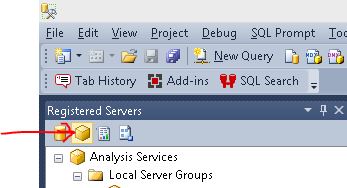
  1. Open up SSMS and select the Analysis Services server type in the Registered Servers window.

Connect to Analysis Services

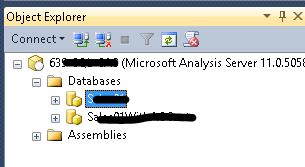
  1. Double-click your server name, so that it appears in the object explorer, then expand the databases folder. Right click on the database you want to backup and select Back Up…

Right-click your database

  1. The Backup Database dialog opens. Fill out the values appropriate for your environment. I highly recommend encrypting your backup files, just don’t forget what the password is otherwise you will never be able to restore your database.

Backup Database dialog

  1. Instead of clicking the OK button when you are done, click the little arrow next to the Script button at the top of the screen and select Script Action to New Query Window. Click the Cancel button to cancel the Backup Database dialog.

Script backup

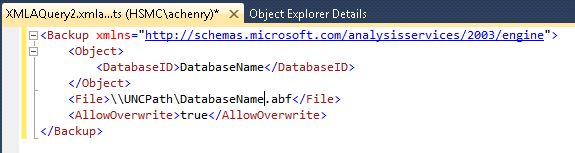
  1. You should now have an XMLAQuery window in SSMS that contains the commands to back up your database.

XMLA Code

Wow, that was easy. Now you can create a SQL Agent job and just paste this XMLA query in the job step (be sure to select SQL Server Analysis Services Command as the job step type) and call it a day. But you probably shouldn’t. As you will notice, I selected the Allow file overwrite option in the Backup Database dialog and that is reflected in my XMLA script with the AllowOverWrite tag set to true. So, if I created a SQL Agent job to run every day and used this as my job step, I would never have any backup history, I would only have the most current backup. For some shops, this will be okay, for others, it won’t. In my shop it wasn’t enough. Policy dictated that I keep one week of backups, regardless of whether it was a transactional database or an OLAP database.

Luckily, PowerShell and I have become good friends. I was able to quickly create two additional steps in my SQL Agent job that utilized PowerShell commands to achieve my goal of maintaining one week of backups. I created one step to rename the backup file by appending the current date to the file name and the other step I created to clean up any old backup files, so that I didn’t fill up my hard drive with backup files. Here are my scripts.

Rename file:

cd c:
$today = get-date -uformat "%Y%m%d"
$oldname = "\\uncfilepath\Databasename.abf"
$filepath = "\\uncfilepath\"
$newname = $filepath + "Databasename_" + $today + ".abf"
rename-item $oldname $newname


Clean up old files:

cd c:
$RetentionDate = (Get-Date).AddDays(-6)
$FilePath = "\\uncfilepath"
Get-ChildItem $FilePath -recurse -include "*.abf" | Where {($_.CreationTime -le $RetentionDate)} | Remove-Item –Force


I won’t go into detail about my PowerShell script here, it’s mostly self-explanatory, with the exception of the first line in each, cd c:. I discovered that since I was using a UNC path, I needed to add this little tidbit to the beginning of each script otherwise the steps would fail. This is because the version of PowerShell that is being invoked inside a SQL Agent job is not EXACTLY the same version that is invoked outside of SQL Server.

Managing Security – TSQL2sday # 63

A big thank you goes out to Kenneth Fisher ( b | t ) for hosting this month’s TSQL2sday party. Security is a big deal. How many times have you opened the paper (I’m dating myself, I know – no one reads an actual newspaper anymore, it’s all online now) in the last 6 months and there’s a story about another security breach, more records compromised or flat out stolen? Too many. While securing your data is probably the key to keeping your current employment status, there’s also a piece of security that is quite often overlooked and could be the reason for a resume generating event. Recovering from a failed server when you don’t use any of the HA features that are now available.

TSQL2sDay150x150

The scenario:
Your production server has failed and you don’t use any of those new fancy HA features like Always On Availability Groups, Log Shipping or even Database Mirroring. Your server hosts a standalone instance for the HR/Payroll department. Payroll must be processed in the next two hours or your company will be out of compliance with Federal Regulations and face heavy fines, not to mention all the really mad employees who won’t get their paychecks on time. I don’t know about you, but I do NOT want to be responsible for every employee not getting a paycheck, including myself.

You have a good backup plan in place, you take full, differential and log backups on a schedule that meets the minimum required data loss SLA and send those backups to a remote SAN data store. Your Sysadmin stands up a new standalone server for you in 30 minutes. You install and configure SQL Server in about 60 minutes (those pesky service packs and cumulative updates can take quite a bit of time). Now you are left with 30 minutes to get your databases restored and functioning. No sweat! Easy as 1..2..3, right? Wrong!

You restore your database only to discover that all your logins no longer exist on your brand new server. No problem, just recreate the logins and give them brand new passwords (SQL Authentication). All will be right with the world. You give your HR/Payroll department the okay to proceed and you catch your breath with 20 minutes to spare. The phone rings 5 minutes later, it’s HR/Payroll and it’s not working. They are getting invalid login errors. You have that momentary flashback to when you helped with the application install 4 years ago – the vendor hard coded the password into their application code, so you can’t just change it or give it a new password. That’s when you remember that you created a job to script the logins with their passwords on a weekly basis and saved the results off to file on that same remote SAN data store as the backups. Hallelujah! You find your script on the remote SAN data store, clean up the logins you created, then execute the script with the logins and their passwords. HR/Payroll is back up and running with 4 minutes to spare.

Paychecks for everyone!

While some of this may seem far-fetched, it’s based on an actual incident very early in my career. I may have embellished a little, but you get the point. You need to make sure you can recreate any login on your server at any time due to disaster/failure. If you can’t, you may just be looking for a new job.

To this day I still script the logins on all my servers on a weekly basis. I store that file in a secure location on a remote server. I’ve never had to use one since this original incident, but it’s nice to know that I can recreate the logins if I ever need to. Can you?

Transaction Isolation Level Blues

Have you ever had a mental block in one particular area when learning something? It might be the simplest thing, but for some reason your brain turns to Teflon when you try to store the information. For example, I have a degree in Math, so I am pretty good at arithmetic, but for the life of me I cannot remember what eight plus five is. I always have to break out my phalanges to get the answer.  Why the Hell can I remember what phalanges means and not a simple thing like eight plus five?!

I have this same problem when it comes to Transaction Isolation Levels in SQL Server. I can remember that there are five of them, Read Uncommitted, Read Committed, Repeatable Read, Snapshot & Serializable, but I cannot remember the little nuances that set them apart. It’s total Teflon. So I decided it was time to come up with a little song to help me remember. My older sister is a preschool teacher and she says that if you learn something as a song, it sticks with you for life. Here’s hoping that is true!

This is sung to the tune of George Thorogood’s Bad to the Bone.

At the time I am used
No Shared locks are issued
Not blocked by X locks
It is Loosey-Goosey
Just call me crazy
No restrictions abound
I could tell right away
It was Read Uncommitted

Bad to the bone
Bad to the bone
B-B-B-B-Bad
B-B-B-B-Bad
B-B-B-B-Bad
Bad to the bone

Not breakin’ any rules
Going by the book
Not readin’ any uncommitted
Transactions it’s true
I am the default baby
Transactions alone
I’m Read Committed
That’s what I do

Bad to the bone
B-B-B-Bad
B-B-B-Bad
B-B-B-Bad
Bad to the bone

No readin’ ’til committed
Can’t read dirty data either
I use shared locks baby
And hold ’til committed
I’m the repeatable read baby
Yours and yours alone
Data’s all yours honey
And I’m bad to the bone

B-B-B-B-Bad
B-B-B-B-Bad
B-B-B-B-Bad
Bad to the bone

When I query data
Kings and Queens step aside
Every bit I meet
It’s mine it’s all mine
Serializable baby
Range blocks on keys that’s me
HOLDLOCK does the same thing baby
Serializable oo-ee

Bad to the bone
B-B-B-B-Bad
B-B-B-Bad
B-B-B-Bad
Bad to the bone

(Extra verse)
There’s no write blockin’
While I’m readin’
No locks less I’m recoverin’
You can’t switch to me
But I can switch to you
I’m a snapshot baby
A photo just for you

Bad to the bone
B-B-B-B-Bad
B-B-B-Bad
B-B-B-Bad
Bad to the bone

If your brain is Teflon when it comes to Transaction Isolation Levels, then I hope this helps. If not, I hope you got a good laugh and please don’t tell George Thorogood what I did to one of his best songs (and one of my favorites).

By the way, eight plus five is .. thirteen.

Summit 2014

It’s hard to believe it’s over.  It felt like a whirlwind while I was in Seattle for my 7th PASS Summit, but now that I’m back home it feels like it was ages ago.  I think time moves more quickly when you’re with friends and that’s where I was, with friends.

I got to reconnect with old friends and meet new ones.  I didn’t attend nearly as many sessions as I would have liked, because let’s face it, cloning technology isn’t quite where it needs to be as Michael Keaton found out in Multiplicity.  With my luck my “Number Four” would have attended one of Paul Randal‘s sessions and I would have wound up doing God knows what to my servers when I got back.

I also got to meet people that I have “worked” with for quite a while virtually, but never met in person.  I must say it’s always refreshing when their “in person” exceeds your expectations.  There are so many genuinely nice people in our community, I am truly in awe.

In years past I have not been able to participate in most of the after-hours activities due to Summit happening right before a big annual swim meet, which meant I couldn’t take a break from training.  This year, my swim meet was the week before Summit so I didn’t need to get up at 4:30 a.m. every morning to make it to practice before breakfast.  I got to see how the “other half” lived at Summit this year.  I must say it was eye opening and entertaining.  They don’t have next year’s swim meet on the calendar yet, but I have the Summit dates, so next year’s meet just may have to go on without me.

If you’ve ever attended a PASS Summit, you know what I’m talking about when I say I’ve already started the count down until next year’s Summit.  If you’ve never attended a Summit, what are you waiting for?

I Didn’t Hyperventilate!

I gave what is officially my second presentation this week. I presented at the Triad SQL BI (Twitter | PASS) user group meeting and I didn’t hyperventilate! That’s a huge deal for someone like me, who is petrified of public speaking.

It started out a little rough though.

Timeline
Friday, 8/22 (just 4 days before presentation date) – I met Katherine Fraser (SQLSassy) for lunch and she mentioned that their scheduled speaker had just cancelled on them the day before. I asked her what she was going to do and she said unless I wanted to present for her, she had no idea. I jokingly said, “Yeah, sure, I’ll present”. Do not EVER, tell a chapter lead you will present, even if joking around because they will pounce on you! Lesson learned there. I agreed to present a very introductory session on SSIS. I then went home and started to panic.

Saturday, 8/23 – I woke up with a horrible sinus headache and thought I was in the beginning of nasty sinus infection. Now I really started to panic. I sent Martin to the drugstore to buy every sinus medication they had on the shelf. There was no way I could be sick, I could not cancel on Katherine after I had just agreed to present the day before. I proceeded to pound down some Emergen-C and drink about a gallon of water an hour for the rest of the day.

Sunday, 8/24 – I woke up at 4:30 a.m. to take part in the upgrade of major system at work. I felt about the same as Saturday. I pounded some more Emergen-C and worked until 11:30am. After we got the green light from the testers at 3:30 p.m., I went to bed and collapsed.

Monday, 8/25 – Woke up feeling much better, but not great. Pounded more Emergen-C. Started to work on my presentation. Did I mention that I didn’t have anything prepped for a presentation? I’m not a speaker, why on earth would I have a presentation ready to go? Got a call from my boss that the system upgrade wasn’t going so smoothly and had to start firefighting in production.

Tuesday, 8/26 – Presentation day. Got the word from my boss that the system upgrade was still up in the air, but none of the pieces that were broken were anything I could help with or fix. I started to work on my presentation. Just before lunch time I was told I had two conference calls I needed to participate in. Great, another two hours I don’t get to work on my presentation! Finally done with conference calls, when I got a call from my boss, we are rolling back the upgrade and I need to bring the old server back online. Luckily I had been able to create the content of the presentation and test it. I just didn’t have any time to do a practice run through. That was going to have to be enough, it was time to go to Winston-Salem.

I arrived in plenty of time, but I forgot: the power supply for my laptop, my external mouse, speaker evaluation forms and my list of things I needed to take with me to the meeting. Luckily my laptop was fully charged and didn’t die during the presentation (in fact I could have gone on for another 2 ½ hours, thankfully no one wanted to stay that long!). A mouse was provided by our wonderful host, Matt Clepper of Inmar, but not before I had a slight mishap using that @!#$%^& embedded mouse on my laptop. Katherine was well prepared and brought speaker evaluation forms. As for my list of things I needed to bring with me, well, I just had to “adapt and overcome”.

The presentation went pretty well, I didn’t hyperventilate. Sometimes you have to have a very simple goal, just survive without a trip to the ER.

Wrap up
Overall it was a good experience. I think I did a good job of presenting and the feedback I got reinforced that. There were some great ideas on what I could have done better and some great comments on what I did well.

Will I speak again? Probably. I’m not sure I’m ready for a SQL Saturday quite yet, but maybe another couple of times at UG meetings and I’ll think about it. A huge “Thank you” goes out to Katherine for taking a chance and believing in me.

Of course I didn’t sleep at all Tuesday night. I kept thinking, “I forgot to tell them…”